 TerminalNexus
Every file on my hard drive in 1993 was allowed a name of eight characters, plus three for the extension. That was the law of DOS and Windows 3.1, and it turned every disk into a guessing game. REPORT1.TXT. LETTER2.DOC. MANUAL.TXT, which manual? You saved something in January and by March you were opening files one by one to find out what they were.
I hated it enough to do something about it. My first Windows program had a menu item called Add Long File Name, and it let you hang a description of up to 255 characters on any file in its catalogs. The file on disk kept its stubby DOS name. Inside my program, it had a real one, and the list showed both side by side. I started writing that program in February 1993. Long file names reached regular Windows machines with Windows 95, two and a half years later, and Windows 3.1 never got them at all. (Yes, NT had them earlier. Nobody I knew ran NT.) Even the limit Microsoft eventually picked was 255 characters. I take no credit for that, but it still makes me smile:)
The program was called FastView, and I know exactly when it began because the proof is hard-coded in the source. The main text window's default content, the string a user would see before opening anything, reads: "Daniel's first Windows program !!! started 02-20-1993". Three exclamation marks. I was excited.
What it was
FastView was a catalog and viewer for text files. You built catalogs, lists of files from anywhere on the disk, and each catalog showed up as a list box next to a text pane. Click a file, its contents appeared instantly. No Open dialog, no digging through directories. The whole point was speed: every text file I cared about, one click away, with a name I could actually read.
The catalogs that shipped with it tell you what my disk looked like back then. One catalogs PKZIP manuals and readme files from c:\cserve\download, which is where CompuServe put everything. Another holds DOS networking notes and an AOL quick reference. The third catalogs every INI file on the machine. Downloads, docs, and configs: the three food groups of a 1995 hard drive.
It was strict about its limits. ASCII files only, nothing over 30,000 bytes, and the help file states the system requirements with a straight face: Windows 3.1 or later, a VGA monitor or better, at least 2MB of free disk space. Files past the 30K line got handed to a configurable external program, Windows Write by default. The list box could sit on any side of the window you liked, in whatever colors you liked, sorted alphabetically or in the order you added things. And a right click popped up a menu of the last ten files you had open, which does not sound like much until you remember context menus were barely a thing anywhere on Windows 3.1.
The search that earned its name
The feature I leaned on hardest was search. Not search in the open file, search across a whole catalog, or all of them at once. Two terms with an And/Or switch, an option to show file names only, and live counters ticking while it ran.
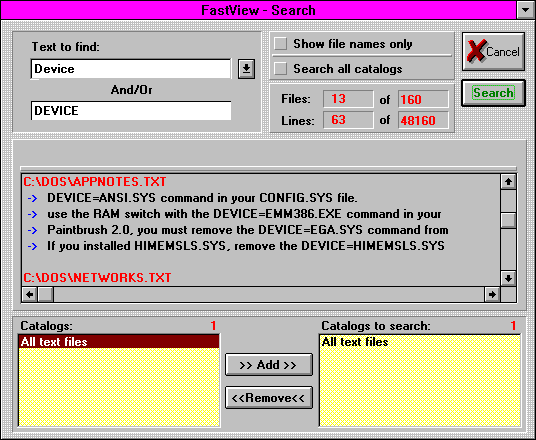
That screenshot is from the help file, dated April 1995 on disk, and the numbers in the corner are real: 63 matching lines found in 13 files, out of a catalog of 160 files and 48,160 lines. Results came back as file names in red with the matching lines listed under each one, and you clicked through to the file. It was grep with a face, years before I would ever hear the word grep, running over a curated set of files instead of a whole disk so it stayed quick on the hardware of the day.
There was also a standalone FastFind exe for hunting files on disk, because once you have a search dialog you like, you want it everywhere.
The INI editor, because everything was an INI file
Windows 3.1 kept its entire personality in text files. Win.ini, system.ini, and a private INI for every program you installed. So FastView grew an INI editor, and it grew into a full tool that also shipped as its own exe.
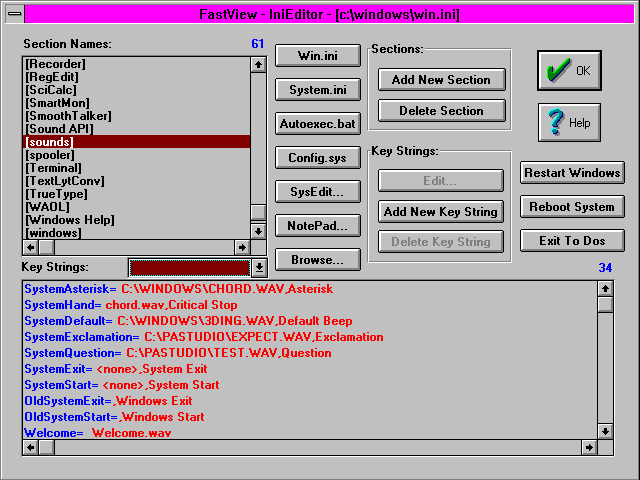
Sections down the left, that's a real win.ini with 61 sections. Key strings below. One-click buttons for win.ini, system.ini, autoexec.bat, config.sys, SysEdit and Notepad. And on the right, the three buttons that date this screenshot better than any timestamp: Restart Windows, Reboot System, Exit To DOS. You needed those constantly, because editing win.ini meant restarting Windows to see the change. I put reboot buttons in a text editor and at the time this was completely reasonable.
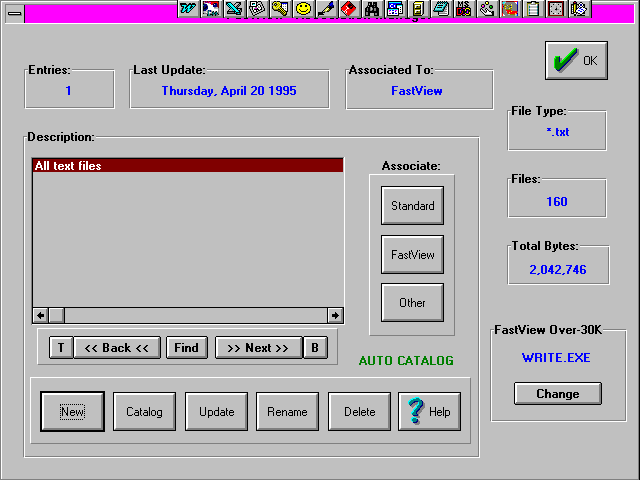
The third module was an Association Manager, which auto-cataloged files by extension and kept running stats per catalog. My *.c catalog in the April 1995 screenshots holds 547 files. That number is the learning trail: 547 C files on the machine of someone teaching himself to program.
Built the hard way, all of it
The surviving source is Borland C++ 4.0 with OWL, and the dialogs wear BWCC, Borland's custom controls, which is why every OK button in the screenshots is a big chiseled green check mark. If you ever used a Borland app of that era, you know that button.
Nothing came for free on that stack. Tooltips, the little yellow hints every toolbar has had for decades, did not exist as a stock control, so there are 495 lines in the source implementing them by hand: a tooltip window class, a font class, timers for the first-hover delay and the follow-up delay. Owner-drawn list boxes to get the tab-stop columns showing the DOS name, the long name and the path. A print module with printer setup. A real Windows help file with 13 screenshots, compiled, going by its timestamp, in September 1995. The one date I fully trust is the one typed into the source itself. The file dates have been through three decades of disk copies, so I take them as roughly right and nothing more. All in, FastView and its two companion exes come to about eleven thousand lines of C++, all of it written on my own time, for an audience of one.
The long file names themselves were catalog entries: the path, a separator character, then whatever name you gave the file. The status bar hint still reads "Adds up to 255 characters to current file name". When you rebuilt a catalog, the code went out of its way to carry the long names over, and the comment above that block says so in plain words, this operation updates the catalog but saves the old long file names. Losing them would have defeated the whole program.
And because no first program is complete without one, the File menu contains an item labeled "Safe Current Text". Not Save. Safe. The command constant in the source is CM_SAFE, so the typo went all the way down. It sat in that menu for years and I never noticed. If there is a person to blame for quality assurance on this product, that would be me:)
It never shipped, and that was never the point
FastView had no customer, no download page, no version 2.0. It was the program I taught myself Windows programming on, and then it quietly became the program I actually used. The catalog files in the installed copy carry timestamps from late 1997, more than four years after that February 1993 string. It earned its keep on one machine, mine, every day, for years. Five more years would pass before anyone paid me to write software.
Looking at it now, the seed of everything I built afterward is already in there. A few years later I wrote InfoStore, a note keeper where every note was its own file. Years after that came Universal Explorer, a database toolbox I did ship, with search and compare at its heart. Different decades, different stacks, the same itch: put the things I need one click away, with names I can read.
Not bad for a first program.
Comments