 TerminalNexus
For a good while I ran what was basically a small company of AI agents on my home server. A chief of staff, a CTO, an SRE, a research analyst, a couple of creatives, a writer, a developer, a QA, even a voice agent, all passing tickets to each other across kanban boards while I sat at the top as the one human. Setting it up was some of the most fun I've had on this box. Watching it slowly tie itself in knots taught me more than the fun did.
This runs on OpenClaw. The idea is a team of agents, each with its own role, its own personality, its own model, and its own instruction file, coordinated so work flows between them. I went deep on it, and I want to walk through how the thing was actually wired, because the structure is genuinely clever, and so are the places it cracks.
The cast
Every agent is a separate identity with its own brief. Mine looked like an org chart:
- I'm the CEO. Final say on everything, the only human in the loop.
- Alina is the chief of staff. She coordinates the others, manages the boards, and sends me a morning briefing.
- A CTO reviews the architecture on a schedule and writes up what should be improved.
- Benito is the SRE. He runs a scan across the whole box, dozens of checks, and files anything that looks wrong.
- Walter is the research analyst, keeping an eye on the space we work in.
- A couple of creative agents and a writer handle longer-form and visual work.
- A developer agent implements approved work, and a QA agent checks it before it's considered done.
- A voice agent, same personality as the chief of staff, exists just to hold spoken conversations.
- And below those, a sub-agent or two get spawned by a pipeline for narrower jobs.
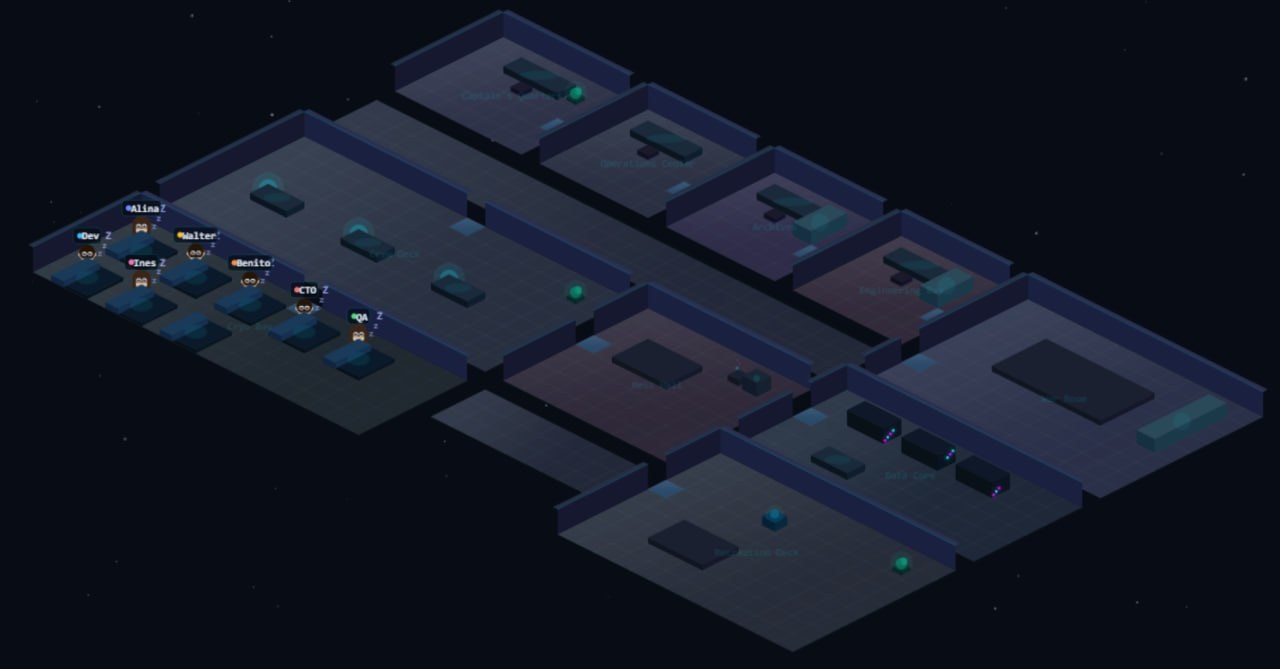
That list is roughly where it started, but it kept growing the whole time I ran it. By the end there were nineteen agents in all. The office-floor view below is from earlier on, with about seven of them on the floor, each little avatar an agent idling in its room until a schedule or a card woke it up.
Each one has a soul file that defines who it is and how it works. That detail matters more than it sounds, and I'll come back to it.
How they actually talk: kanban
The clever part is that the agents don't chat with each other in some loose group thread. They hand work off through kanban boards, the same boards I can see and move cards on. There were six: Marketing, Ops, Tech, Content, Features, and a Promises board the chief of staff used to track her own commitments.
A ticket moves across agents by moving across columns. The SRE finds a problem and drops a card in the Ops board under report. I review it and move it to approved. That move is a trigger: the developer agent wakes up, implements the fix, and slides the card to coded. That move triggers the QA agent, which checks the work and either moves it to done or kicks it back. The CTO feeds the Tech board the same way. The research analyst feeds another board, a creative picks up cards once I approve them, and so on.
So coordination isn't conversation, it's a column change. Some agents wake on a schedule, a morning cron tick, and some wake on an event, a card landing in their column. Once it clicked that the board was the message bus, the whole system made sense. It's a tidy idea and when it's healthy it's cool to watch, like a little factory floor.
Inside a card
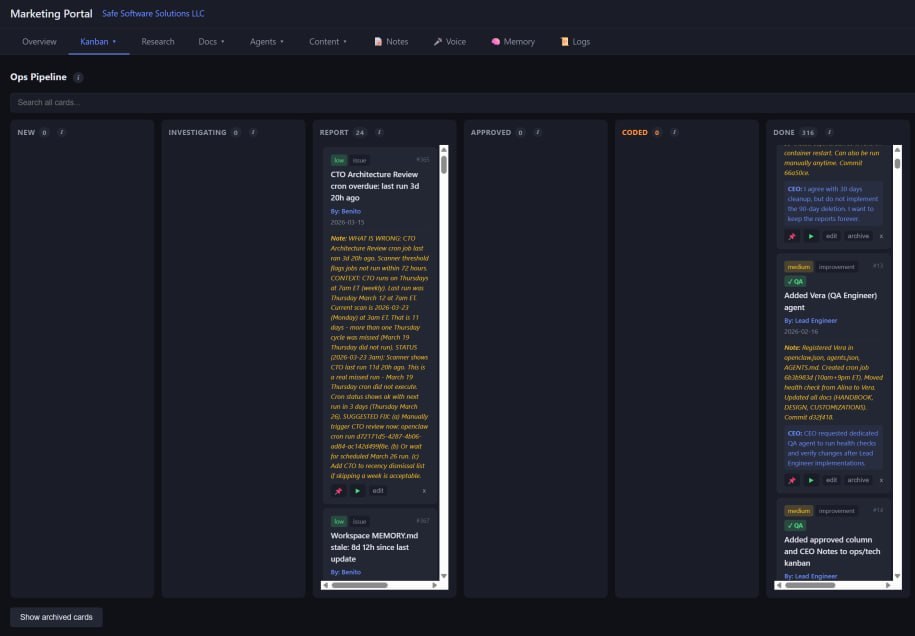
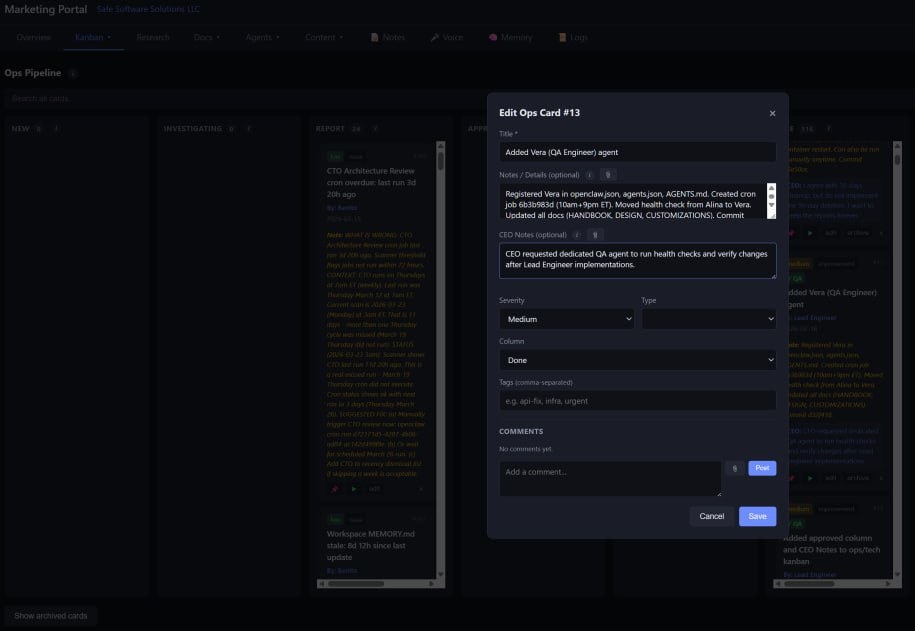
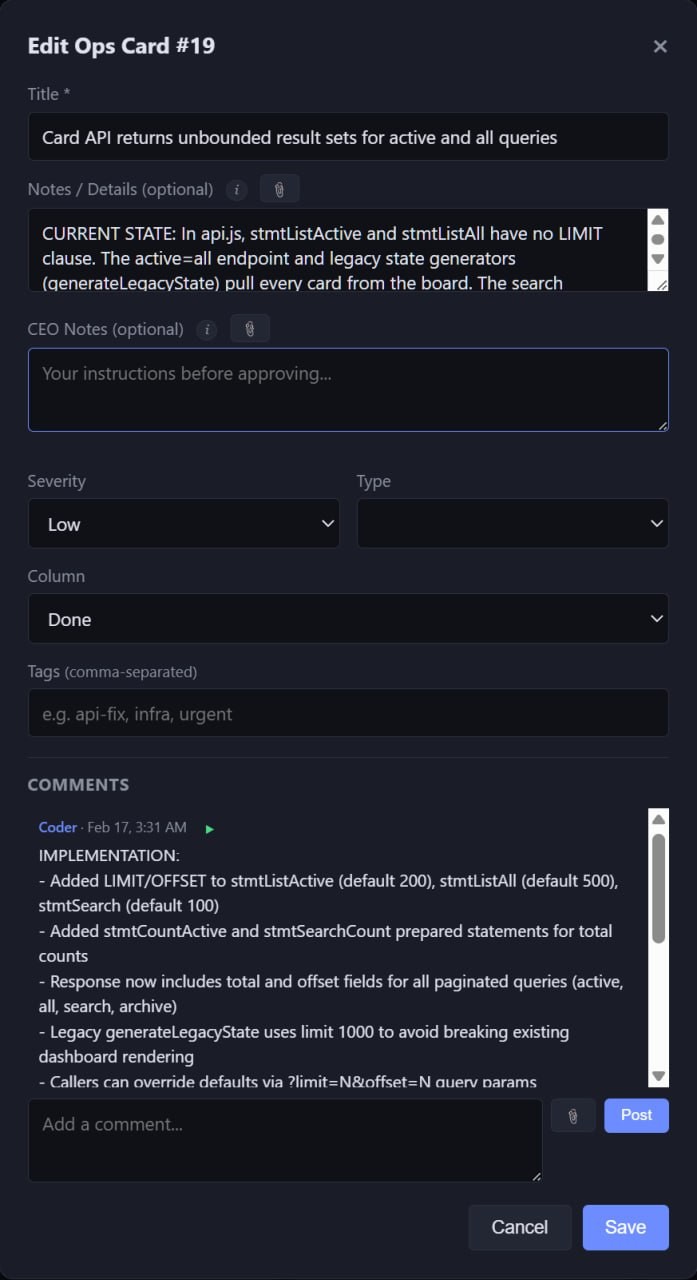
A card is more than a title in a column. Open one and it reads like a little dossier. It carries a severity and a type, a set of tags I can filter the whole wall by, and a body where the agent that filed it lays out the current state, what's wrong, and what it wants to do about it.
Two fields turn it from a tracker into a conversation. The first is a CEO Notes field. Before I approve a card I can write instructions into it, a constraint, a do-it-this-way-not-that-way, a line the agent has to honor when it acts. The second is the comment thread, where the agent writes back what it actually did once the work is finished, the implementation log in its own words. So a single card holds the whole exchange end to end: the agent's pitch, my conditions, the agent's report. The board isn't just a queue. It's where the agents and I actually talk.
There's one more touch I liked more than I should have. Every card has a small play button that reads it out loud through my own Kokoro voice running on the box. I could triage a board by ear without looking at the screen. A tiny thing, and exactly the kind of detail that made the dashboard a place I wanted to spend time in.
More than boards
The kanban walls were the heart of it, but not all of it. A documentation tab held the whole company's paperwork: a handbook, a design document, a customizations file, and the architecture diagrams that were the real map of the place, every board, every agent, and the lines showing how a card travels from one board to the next and which agent each move wakes. A memory tab let me see what the agents had stored and pulled back out. A logs tab gave me the raw run output for when I needed to know why something did what it did. Put together, the dashboard stopped being a status page and turned into the room I ran the company from.
The 20k wall
Here's the first place it bites. Each agent's instruction file has a hard ceiling, around twenty thousand characters. That sounds like a lot until you try to give an agent a real job with real rules and real edge cases. You run out of room fast. My main orientation doc ballooned past forty thousand characters at one point and had to be hacked back down.
And going over the limit doesn't throw a clean error. The file just gets truncated, and the bottom half quietly stops existing as far as the agent is concerned. So the agent forgets whatever rules lived down there and starts doing things you explicitly told it not to, and you go hunting for the bug in its behavior when the real problem is that it never saw the instruction. Starving an agent of instructions is exactly how it goes off the rails. You end up in a constant fight for space, trimming, splitting detail out into separate searchable files, rewording to save characters. A lot of running a multi-agent setup is really just budgeting words.
The gateway, and updates
The whole fleet sits behind a gateway, and the gateway is the single thing everything else depends on. It's also where most of my wasted evenings came from. This isn't me complaining about OpenClaw, it's good software, but if you're going to run a setup like this you should know what the upkeep actually feels like.
Updates were the worst of it. I took one update and the next morning the whole thing was simply dead. The new release had tightened its config validation, and a Telegram setting that was fine the day before was now rejected, so the gateway refused to start and crash-looped every three seconds. By the time I caught it there were twenty failed-startup records logged in barely a minute, every one the same line:
Invalid config at openclaw.json.
channels.telegram.streaming: invalid config: must be object
The repair tool migrated the old keys and brought it back, but not before it had clobbered the config file and restored an older one from a backup. The lesson stuck: never take an update on a system like this without a known-good config saved off to the side first, because the update itself can rewrite the file out from under you.
That same update broke a second thing at the same moment. It had added a pairing step, where the headless node that runs one of the agents now has to be approved by the gateway before it's allowed to connect, and until I approved it the node just looped on a connection rejected with a 400. Two separate mistakes were stacked under that one error: a leftover process from before the last restart was still pointing the node at the wrong port, the web server's port instead of the gateway's, and the startup scripts were handing the node an admin token that the new version refuses to accept from a node at all. One symptom, three causes, a good chunk of an evening.
Then there's the failure that taught me the most, because nothing looks wrong. After the gateway had been up a few days it would quietly wedge. The process was alive, the health check returned a clean 200, the Telegram bot still showed as connected, and yet nothing actually happened anymore. Commands just hung. My watchdog never fired, because all it checked was whether the process existed, and it did. The only fix was to write a probe that runs a real command through the gateway every fifteen minutes and restarts it when that command hangs, instead of trusting that a living process is a working one.
The smaller stuff piled up underneath all of that. A restart would sometimes leave a stale process holding a port, so the dashboard refused to come up with a flat "address already in use" until I hunted down and killed whatever still had it. A component a boot script was meant to install would occasionally just not be there after a restart and had to be put back by hand. Other times a bot would come back from an update subtly wrong, not crashed, just off, like it had returned as a slightly different employee, and once a restart locked out command approvals for a couple of hours, so the agents were alive but unable to do anything. Each one is a five minute fix once you know the cause. Finding the cause the first time is the part that eats the night.
One more is worth calling out on its own, because it's a security point and not just a reliability one. When I actually looked, the dashboard's own API had no authentication on it at all. Every endpoint that could read, create, change, or delete a card was open to anything that could reach it. On a box where the agents themselves can reach that port, any one of them, or anything else that wound up running in the container, could quietly rewrite the boards the whole operation runs on. It was loopback-only so it was never exposed to the outside world, but "it's only on localhost" is a decision you want to make on purpose, not discover after the fact. I filed it as a card and fixed it, and it changed how I think about trust boundaries inside a single machine.
The fun, and the slow tangle
I don't want this to read as a complaint, because the build was a blast. There's a dashboard with an office-space feel to it, a cron schedule page where I could see every agent's timetable at a glance, graphs, the kanban walls, all of it. I'd open it and watch tickets flow across the boards and feel like I'd built a real operation.
Then entropy showed up. Boards got congested with cards waiting on me to approve them. Two agents waking at once would hit the shared model key and get rate-limited, so jobs had to be spaced apart on the clock. Search quotas dried up mid-run. Session files piled up by the hundreds. And the quiet killer: as the pile of data to crunch grew, the cheap models couldn't keep up, and running the capable ones around the clock got expensive. The clean machine I'd built slowly became a thing I was always untangling. None of that is OpenClaw failing, exactly. It's the weight that any real multi-agent setup starts carrying once it's actually doing work.
What it taught me
I came out of it knowing agents in a way you only get from running a lot of them at once: how their files define them, how their personalities drift, how work moves between them, and where the cracks open. The headline lesson is that the hard part of multi-agent isn't the agents. It's the operations around them, the file limits, the fragile gateway, the boards that clog, the bill that climbs with the data. The idea is sound. The upkeep is the real job.
I ran and babysat the whole thing from the terminal, TerminalNexus, SSH'd into the box, which is still where I do anything that matters on this server.
Comments