 TerminalNexus
Call me paranoid, but talking to my computer through somebody else's cloud never sat right with me. Dictation tools like Wispr Flow are genuinely good, and that's the problem. You get used to pressing a key and talking instead of typing, and now there's a subscription attached to your voice, and every word you say to your machine takes a round trip through someone's servers.
I run a homelab with plenty of idle CPU. Speech recognition, small language models, and neural text-to-speech all run fine on local hardware now. So the question stopped being "can I build my own" and became "why haven't I."
Well, I had tried. My first attempt at this died the classic death: a Python install on Windows, a venv, pip fighting native audio dependencies, and a helper service on the server that I never got around to installing. Too many moving parts, and every one of them could fail silently. It sat there half-broken until I deleted it. If you want to blame someone for that architecture, that would be me :)
The second attempt started with one rule: a single compiled exe on Windows, zero runtime dependencies, and every clever part lives on the server where I can fix it without touching the client. That version is called VoiceType, and it stuck.
What it does
Two hotkeys. Both configurable in Settings, but on my machine it's F1 and F2, so that's how I think of them.
F1 talks. Tap it, dictate, tap again (or hold it like a walkie-talkie and let go, it detects which style you meant). About three seconds later the text types itself into whatever has focus. Notepad, a browser, a chat window, an IDE, anything with a cursor.
F2 listens. Select text anywhere, press F2, and the machine reads it to you in a natural neural voice. A long article, or a wall-of-text chat message. Speech starts a second or two after the keypress no matter how long the text is, and the same key stops it.
A small pill at the bottom of the screen shows what's happening (listening, transcribing, speaking) without stealing focus from the box you're typing into.
The part I didn't expect to like this much
The raw transcription goes through a cleanup pass before it's typed. A llama3.2 3B model running in ollama on the box applies your self-corrections, so "I have two, no, three apples" comes out as "I have three apples." It strips the ums and false starts and fixes the punctuation. On CPU it adds well under a second to a short sentence.
Taming a 3B model for this took a few rounds. Early on I dictated "give me an example sentence to test the indexing" and the model, ever helpful, generated an example sentence instead of transcribing my words. The fix was fencing the transcript in tags, adding few-shot examples of dictations that sound like instructions, and a guard that rejects any output containing vocabulary I never said. If the model misbehaves in any way, the raw whisper text is used instead. A dictation is never lost to a moody model.
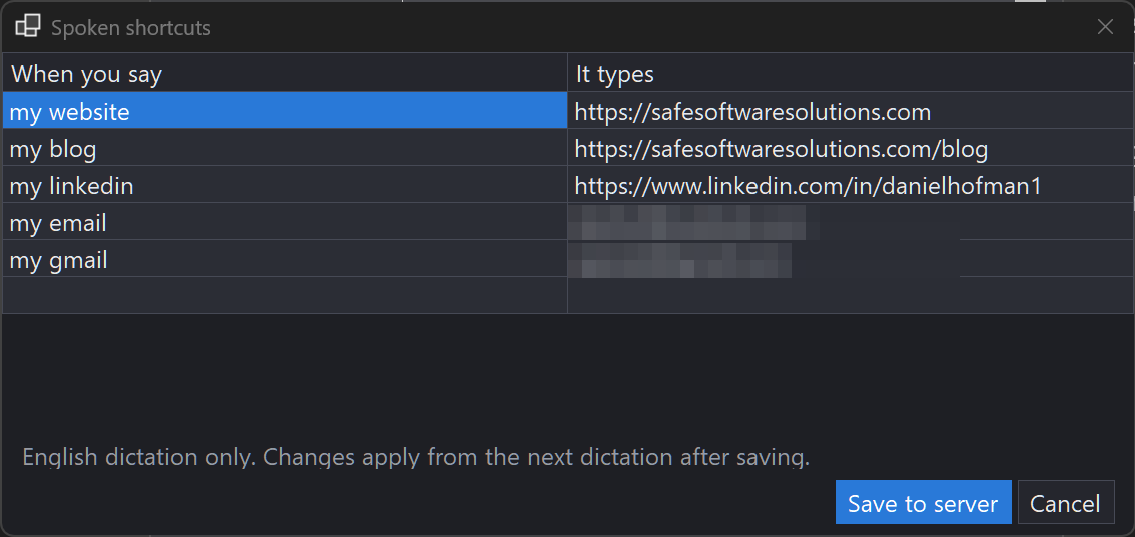
The cleanup layer also gave me spoken shortcuts for free. I say "my website" and the full URL gets typed. The phrase list lives on the server and hot-reloads, and there's a small editor for it in the app's Settings, so adding a shortcut takes seconds and the very next dictation picks it up.
Languages
This started English-only, until my wife wanted in. She speaks Spanish and French. I speak English and Polish. My first instinct was a second container so her multilingual model wouldn't slow mine down.
Then I benchmarked it and deleted that plan. The multilingual whisper medium model transcribes a ten second clip in 3.1 to 3.4 seconds regardless of language, same as the English-only model it replaced. So there's one container now, and a language dropdown in Settings: English, Spanish, French, Polish, or Auto-detect.
Auto-detect is the setting for my wife. She flips between three languages all day, and making her pick one in a dialog every time would have killed the whole thing. Whisper figures out the language per dictation and charges about two extra seconds for it. The LLM cleanup pass only speaks English, so Spanish and French dictations skip it and come back as whisper wrote them, which turns out to be fine. Whisper's own punctuation in those languages is solid.
Adding a second PC is copying the exe and a config file over. It talks to the box over the home network, requests queue if two people dictate at the same time, and that's the whole multi-user story.
Speak one language, type another
The newest trick took the language support somewhere I didn't originally plan: translation, in both directions.
While you're recording, the pill now shows four small language buttons.

Click one and that dictation comes out in that language, whatever language you spoke it in. Dictate in Spanish, tap EN, English text types itself. Ignore the buttons and everything works like before. They only appear if you turn them on in Settings, and recording starts instantly either way, so choosing a language costs zero time.
Under the hood there are two paths. English output is free: whisper can translate any speech straight to English in the same pass it was already doing. The other targets go through a second local model on the box. I tried a few for this job, and the results were an education: the 3B cleanup model produced Polish that was half English, and a well-known 7B model drifted into Chinese mid-sentence, in a Polish translation, at temperature zero. The model that just quietly did the work in every direction was a Mistral 7B variant that had been sitting on my disk the whole time. There's also a guard that rejects any output in the wrong alphabet, and if translation fails entirely you get your words untranslated. Same rule as everywhere else in this app: a dictation is never lost.
The same buttons work on read-aloud. Select an English article, press the speak key, click PL, and it reads the article to you in Polish. Spanish and French come out in Kokoro's actual Spanish and French voices instead of an English voice mangling the accent. Polish was the fun one: Kokoro has no Polish voice at all (the voices prefixed "p" turn out to be Brazilian Portuguese), so Polish speech goes through Piper, which has two good free Polish voices, and I baked it into the relay container rather than standing up yet another service. For long texts the whole thing is pipelined: the text is split into paragraph-sized pieces, and while one piece is playing the next is already translating, so speech starts a few seconds after the keypress even on a long article.
Two smaller things landed in the same run of evenings. Each of us now has a profile, so my spoken shortcuts and my wife's don't collide ("my website" types my URL, not hers). And dictations can optionally be archived, per person, into my notes system, where the nightly index makes them searchable by meaning later. Where did I say that thing about the backup strategy last week? Now that's answerable.
The settings
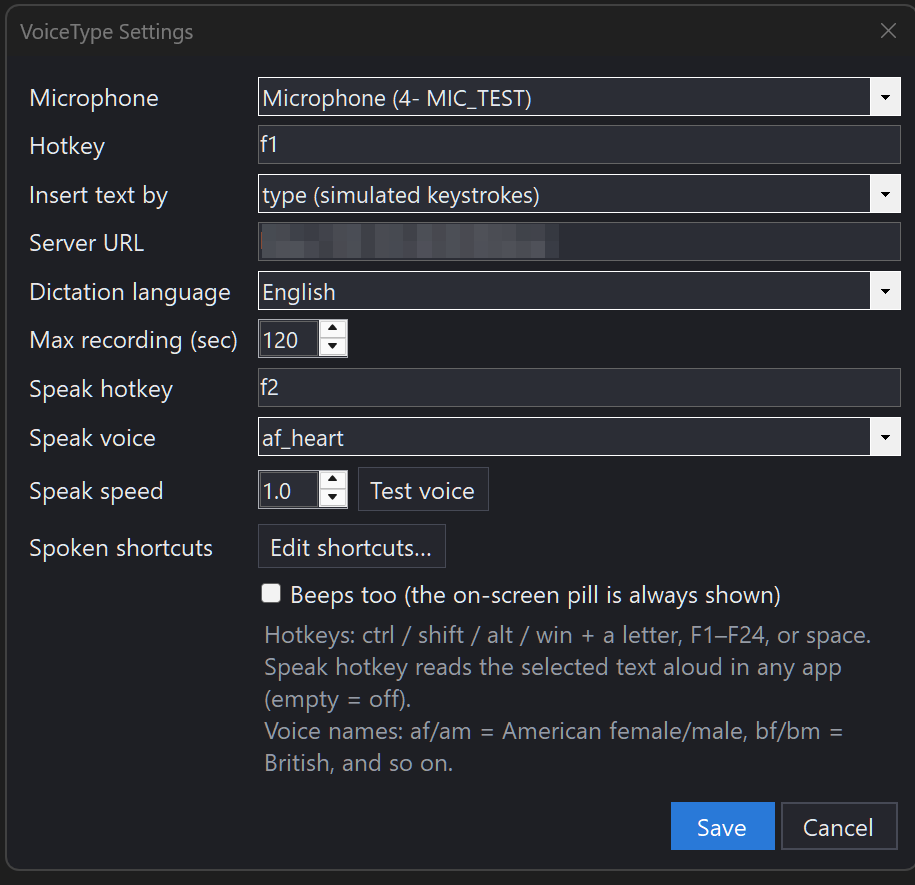
Everything lives in one dialog on the tray icon: microphone picker (remembered by name, so unplugging the USB mic doesn't break it), both hotkeys, server URL, dictation language, max recording length, and the read-aloud voice and speed. The voice dropdown pulls the live list from the server, 67 voices, with a Test button that speaks a sample so you can shop around. Speed goes from 0.5x for careful listening to 3x for skimming.
How it's built
The Windows side is a C# .NET 8 tray app, one self-contained exe around 160MB, no installer, no admin rights. It records with NAudio, posts the audio to the box, and types the result using synthesized Unicode keystrokes so it works in nearly every app. That's it. The client is deliberately dumb.
The server side is three containers plus ollama:
services:
  whisper-dictate:
    image: onerahmet/openai-whisper-asr-webservice:latest
    environment:
      - ASR_MODEL=medium
      - ASR_ENGINE=faster_whisper
    volumes:
      - ./whisper-cache:/root/.cache/whisper
    ports:
      - "9003:9000"
    restart: unless-stopped

  dictate-clean:
    image: dictate-clean:1.3.0   # small FastAPI relay, built locally
    environment:
      - WHISPER_URL=http://whisper-dictate:9000
      - OLLAMA_URL=http://host.docker.internal:11434
      - OLLAMA_MODEL=llama3.2:3b
    volumes:
      - ./replacements.json:/data/replacements.json
    ports:
      - "9004:9000"
    restart: unless-stopped
Speech-to-text is the whisper ASR webservice image, and read-aloud comes from a Kokoro-FastAPI container I already had running for other things. The box is an i9 with 64GB of RAM and no GPU, and none of this needs one. Whisper medium, the 3B cleanup model, and Kokoro all run comfortably on CPU, and the cleanup model stays resident so there's no warm-up pause.
Most of the iteration happened through Claude Code running on the homelab. I'd send a voice note from the couch describing what bugged me, a new exe would land on the network share, I'd swap it and keep testing. Seven builds shipped in a single day that way. At some point the loop got circular: I was dictating the feature requests with the app itself. When something went wrong server-side I'd open TerminalNexus and tail the relay container's logs to see what a dictation actually came back as.
The bug that earned its own war story
Long texts played two words of read-aloud and then dissolved into loud static. Short paragraphs were fine. The server's audio bytes checked out clean. The playback code looked correct.
The culprit: Kokoro streams audio one sentence at a time, and a sentence chunk often ends on an odd number of bytes. Each audio sample is two bytes. When playback caught up with the download between sentences, it grabbed half a sample, and from that moment every sample in the stream was split across the wrong byte pair. Byte-shifted PCM sounds exactly like static. The fix is almost insulting in size: never hand the audio buffer an odd byte count, hold the leftover byte for the next chunk. I stress-tested the fixed pipeline by forcing it to starve mid-stream 1,472 times and comparing the output byte for byte. Clean.
Honorable mention: the Win32 struct for synthetic keystrokes was missing its mouse union member, which makes it 32 bytes instead of 40 on x64, which makes Windows reject every keystroke batch while reporting nothing. The app transcribed perfectly for days and typed absolutely nothing. Win32 doesn't care about your feelings.
The numbers
A short dictated sentence lands as text in about three seconds. Read-aloud starts speaking one to two seconds after the keypress, on a ten-word selection or a two-thousand-word article. Language auto-detect adds about two seconds per dictation. The cleanup model holds about 3GB of RAM and adds under a second to short dictations, roughly doubling the wait on very long rambles.
No account, no subscription. The audio never leaves the network, and when I ship a fix, the upgrade is swapping one exe.
Comments